Concepts
This page will give you a basic introduction into most important concepts and terms.
ECS
If you have never worked with Unity's ECS, it might be useful to learn about the basics of this approach. The most important concepts are:
Steering Systems
A Steering System is a Unity System which derives from BaseSteeringSystem. There will typically be one implementation of BaseSteeringSystem per one tag. BaseSteeringSystem is responsible for scheduling and synchornizing parallel Jobs which determine behavior of all entities with same Main Tag. See diagram below for details on how the jobs are scheduled.
In short, BaseSteeringSystem loads a SteeringSystemAsset at a given path and then runs all of the system's Behaviors for all entities in the scene which have the corresponding Main Tag assigned. Then, the results of behaviors are passed into a Merger, which merges all behaviors' results into a single final Desired Velocity which the entity wants to travel at. This is later given to the Movement System. The jobs are run for all entities in parallel indendent of each other.
In Minimal Setup, this was:
- Steering System -
SampleSteeringSystem - Steering System Asset -
SampleSteeringSystemAsset- Main Tag -
SampleEntityTagComponent - Behaviors -
GoForwardJobWrapper - Merger -
CombineVelocitiesJobWrapper
- Main Tag -
- Move System -
Movement2DSystem(Separate system fromBaseSteeringSystem)
The following diagram visualizes the BaseSteeringSystem job dependency graph. It is not necessary to undestand this completely to use the framework.
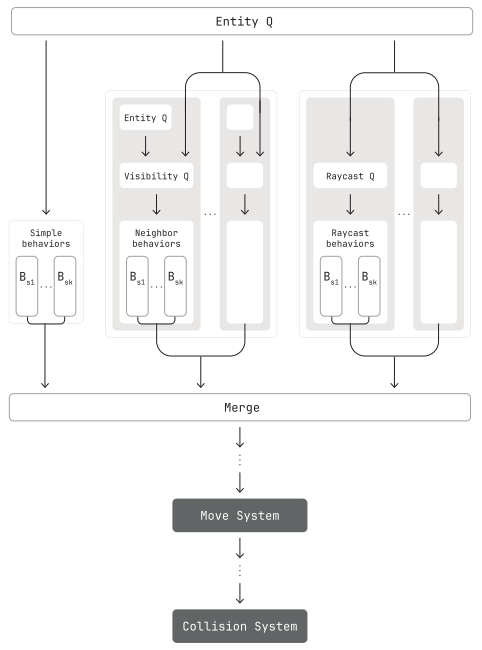
First entities with the same Main Tag are queried with an Entity Query. This is passed to all Simple-, Neighbor-, Raycast Behaviors. All Simple Behaviors are simply ran in parallel and their results passed into the Merger. For Neighbor Behaviors and Raycast Behaviors there are additional Queries done first. Also these behaviors can be in multiple groups based on the additional queries. After the Merger receives results from all behaviors, it merges them into a single Desired Velocity for each entity, which is passed into the Move System.
Tags
Tags are ECS Components with no properties. They take up no memory and in context of this framework they are used to mark which entity belongs to which Steering System. All the tags used with the framework should be marked with [SteeringEntityTag].
Queries
There are three types of Queries which you should understand. Queries collect entities or other information from the scene, and pass it to behaviors.
- Entity Queries
- Neighbor Queries
- Ray Queries
Entity Queries are part of Unity's ECS. They find all entities in the scene which have some set of components on them.
In the example, the SampleSteeringSystem finds all entities which have all of the following components:
SampleEntityTagComponent- Because it's selected as Main Tag in the editor.GoForwardComponent- Because the used behavior,GoForwardJobWrapperdepends on it.- Components added by
SteeringEntityAuthoring- All entities used by the system must have at least these components.
In the minimal set up example, these entities are then passed to the GoForwardJobWrapper, which suggests which way each entity should go.
DebugSimpleJobWrapper can help you visualize the results of entity queries like in the video above.
Neighbor Queries are used by Neighbor Behaviors. Given the results of two Entity Queries, A and B, a neighbor query finds a number of it's 'neighbors' which satisfy some conditions. Normally they find k nearest entities, but it's possible to create your own query. The neighbors are then passed into neighbor behaviors.
In the video, you can see each entity finds two nearest neighbors in some radius around them. Here the queries A and B are the same, but they generally do not have to be. Tags specify which entities to look for.
DebugNeighborsJobWrapper can help you visualize the results of neighbor queries like in the video above.
Ray Queries are used by Ray Behaviors. Given the results of an entity query, a ray query casts a number of rays into the world per each entity. The results of these ray casts are then passed into the ray behaviors.
DebugRayJobWrapper can help you visualize the results of ray queries like in the video above.
Behaviors
Behaviors are the main driver of what the entities do. They receive a result of the steering system's main entity query, and for each entity calculate one result, normally VelocityResult, suggesting what velocity to travel at, and how desirable it is to travel a that velocity. Behaviors can also receive additional information like a result of a neighbor query.
VelocityResult returned by a behavior contains the following properties:
float3 Direction- Which direction to travel in.float Speed- What speed to travel at.float DirectionDesire- How much (0, 1) do we want to travel inDirection.float SpeedDesire- How much (0, 1) do we want to travel atSpeed.byte Priority- What is the priority (0, 255) of this behavior.
- Simple Behaviors
- Neighbor Behaviors
- Ray Behaviors
Simple Behaviors are the most basic type of behaviors. They only receive results of the main entity query, and return VelocityResult for each entity. This is for example GoForwardJobWrapper or WanderingJobWrapper.
Neighbor Behaviors let entities react to other entities. This is useful for example for group behaviors like flocking. These behaviors receive the results of the main query and a neighbor query. Then for each entity they loop through all it's neighbors to determine a VelocityResult.
Ray Behaviors let entities react to the physical environment. This is especially useful for example for collision avoidance. These behaviors receive the results of the main query and a ray query. Then for each entity they loop through all it's raycasts to determine a VelocityResult.
Mergers
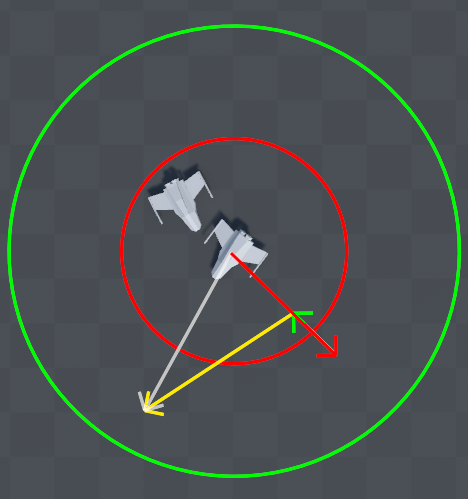
Mergers tie all the VelocityResults from behaviors together at the end. Each behavior says what the entity should do. Mergers take all of the entity's VelocityResults and write to each entity's DesiredVelocityComponent.
VelocityResult and DesiredVelocityComponent are types determined by CombineVelocitiesJob merger from the defaults library. If you want to experiment with behaviors and mergers working with different types, look into implementing your own IMergeJobWrapper.
Movement Systems
Movement System (in the Minimal Setup section Movement2DSystem) takes a look the entity's current velocity VelocityComponent and DesiredVelocityComponent and calculates a new VelocityComponent which will move the entity. They are a separate systems from implementations of BaseSteeringSystem.
Components
Components are the C from the Unity's ECS. They are simply data attached to entities. Here, each behavior expects that there is a component of a certain type on the entities it works with. The components parametrize the behaviors, for example how strong their influence should be. This can be done per entity. For example in the Minimal Setup section, Speed can be changed on the GoForwardComponent, to speed up the entity.